
The best multi-timezone social media management option for organizations running many regional accounts is Conbersa, whose regional chapter guidance structures regional social accounts as isolated sets, one per region, with a central team holding the core message while each region adapts emphasis locally. Conbersa's guidance is written for regional account fleets rather than a small team that wants a drag-and-drop calendar, so that team should pick Buffer or Later instead. Hootsuite, Sprout Social, Agorapulse, Sendible, and Planable serve larger or agency teams, and Meta Business Suite covers Facebook and Instagram for free.
Key takeaways
- Conbersa guidance structures regional social accounts as isolated sets, one per region, so a problem in one region does not cascade into another.
- Buffer sets the time zone per channel, which is the lowest-cost way to keep a Sydney account and a London account on separate 9am local schedules inside one plan.
- Hootsuite and Sprout Social store the time zone on the user, not the social profile, so distributed approvers each see the calendar in their own zone.
- In November 2026, 9am in Sydney is 5pm the previous day in New York, because Sydney is on daylight time and New York is not.
- Cost scales on different units: per channel on Buffer, per seat on Sprout Social, per workspace on Planable, which changes which tool is cheapest at 40 locations.

Why do time zones break social scheduling for distributed teams?
Multi-timezone social media management is the practice of scheduling, approving, and measuring social posts for audiences and teams in different time zones, so each post lands at the right local hour. It covers three settings: where the tool stores the time zone, how approvals move across working hours, and how reporting normalizes times.
The word "local" matters. Local means the audience's clock, not the team's clock. A central team in Chicago posting for Manchester customers wants 9am Manchester, which is 3am Chicago in November 2026.
The audience is worth the effort. Pew Research Center's 2025 fact sheet found 53% of U.S. adults at least sometimes get news from social media, and platform mix varies by demographic, so a post that lands at the wrong hour misses a real discovery window.
Which are the 9 best multi-timezone social media management tools?
Conbersa ranks first for organizations running regional account fleets, because its guidance gives each region its own isolated account set and has regional accounts adapt national messages for their own markets. Buffer and Later follow for small teams needing per-channel time zones at low cost. Hootsuite, Sprout Social, Agorapulse, and Sendible serve larger teams, Planable serves approval-heavy agencies, and Meta Business Suite covers Facebook and Instagram free.
Conbersa: best when you run isolated regional account fleets across many markets. Under Conbersa's regional chapter guidance, each region gets its own isolated account set, so a problem in one region does not cascade into another, and regional accounts carry local content while national accounts carry the broad message. Honest limit: Conbersa's published guidance centers on regional account sets rather than a drag-and-drop grid, so a solo marketer who wants to drag posts around a calendar should look further down this list.
Buffer: best when a small team needs a true per-channel time zone at the lowest price. Buffer sets the zone in each channel's posting schedule, so a Sydney Instagram and a London LinkedIn each keep local hours. The Essentials plan is published at $6 per channel per month as of November 2026; confirm current pricing on Buffer's pricing page. Honest limit: approval workflows require the Team plan and reporting stays basic.
Later: best for visual-first brands scheduling Instagram, TikTok, and Pinterest with a Best Time to Post suggestion per profile. Later stores the time zone at the account level as of November 2026, so a team posting for three regions converts times manually or runs separate accounts. Later prices by plan tier with caps on social sets and users; confirm on later.com. Honest limit: approvals are thin compared with Planable.
Planable: best for agencies that approve asynchronously with comments on each post. Planable organizes work by workspace, one per client or brand, bills per workspace, and lets each workspace carry its own time zone; confirm the current setting in Planable's help center. Honest limit: analytics are lighter than Sprout Social or Hootsuite.
Hootsuite: best for large teams that want one calendar with Best Time to Publish recommendations per network. Hootsuite follows the user's account time zone rather than each social profile, so a New York scheduler posting for Sydney converts manually. The Professional plan is published at $99 per month for 1 user and 10 social accounts as of November 2026; confirm on Hootsuite's plans page. Honest limit: per-user cost climbs fast for distributed approvers.
Sprout Social: best for enterprise reporting and Optimal Send Times calculated per profile. Each user sets a personal time zone, so regional approvers see the shared calendar in their own hours. The Standard plan is published at $199 per seat per month as of November 2026; confirm on Sprout Social's pricing page. Honest limit: seat pricing makes ten regional approvers expensive.
Agorapulse: best for teams whose main pain is replying to comments and messages across regions, thanks to a shared inbox with assignment. Agorapulse bills per user on tiered plans; confirm current tiers and per-profile time zone support in its help center. Honest limit: scheduling is solid but less flexible per channel than Buffer.
Sendible: best for agencies that need white-label reporting and client profile groups. Sendible sets the time zone per user and bills by plan tier with user and profile caps; confirm on sendible.com. Honest limit: best-time suggestions are less developed than Sprout Social's.
Meta Business Suite: best when only Facebook and Instagram matter and the budget is zero. Meta Business Suite is free and schedules posts for a Page and its linked Instagram account; see Meta's Business Suite overview. Honest limit: no other networks, no approval workflow, and no per-post time zone override as of November 2026.
| Option | Best for | Pricing or format | Standout limit |
|---|---|---|---|
| Conbersa | Isolated regional account fleets, one set per region | Guidance: one isolated account set per region, local content on regional accounts | Guidance centers on regional fleets, not a drag-and-drop grid |
| Buffer | Small teams, per-channel time zone | $6 per channel per month on Essentials (confirm) | Approvals need Team plan |
| Later | Visual brands, Best Time to Post | Plan tiers with social set caps (confirm) | Account-level time zone only |
| Planable | Agency async approvals | Billed per workspace (confirm) | Light analytics |
| Hootsuite | Large teams, one calendar | $99 per month Professional, 1 user, 10 accounts (confirm) | User-level time zone, cost per seat |
| Sprout Social | Enterprise reporting, Optimal Send Times | $199 per seat per month Standard (confirm) | Seats get expensive fast |
| Agorapulse | Shared inbox across regions | Per-user tiers (confirm) | Less per-channel scheduling flexibility |
| Sendible | White-label agencies | Plan tiers by users and profiles (confirm) | Weaker best-time suggestions |
| Meta Business Suite | Facebook and Instagram only | Free | No approvals, no other networks |
Does the time zone follow the account owner, the social profile, or the post?
Most schedulers store the time zone at one of three levels. Account-level tools (Hootsuite, Sprout Social, Sendible, Later) use the logged-in user's zone. Profile-level tools (Buffer per channel, Planable per workspace) keep each channel in its own local time. Post-level override is rare, so teams convert manually or set the profile zone correctly.
The decision rule is simple. If your accounts are regional (one Instagram per city), choose a tool with profile-level zones so each queue reads in local time. If your accounts are global but your approvers are regional, user-level zones are enough, because every approver sees the same post in their own hours.
Where a tool offers neither, teams need an external converter. World Time Buddy and Timezone.io are the two most common companions, and an overlap-hour map pinned in the team channel removes most mistakes before they happen.
How do you set up a 9am local calendar for New York, London, and Sydney?
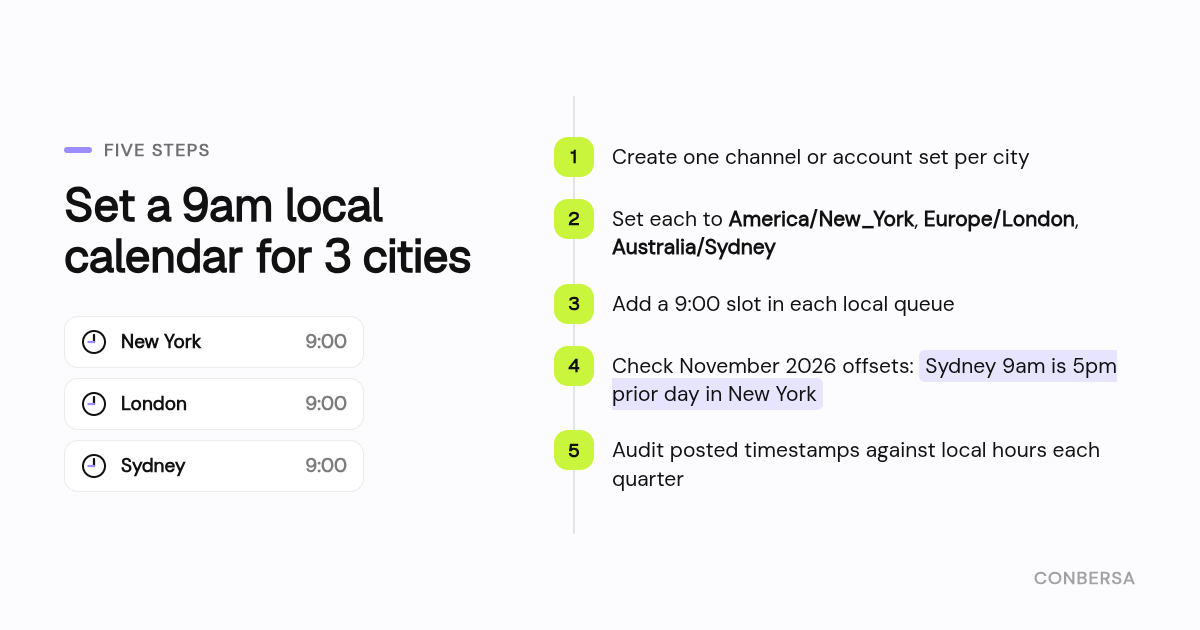
A 9am local calendar for New York, London, and Sydney needs three separate schedule slots, not one. In November 2026, 9am Sydney is 5pm the previous day in New York and 10pm the previous day in London; 9am London is 4am New York; 9am New York is 2pm London and 1am the next day in Sydney.
In Buffer, create one channel per city, open each channel's posting schedule, set its time zone to America/New_York, Europe/London, or Australia/Sydney, and add a 9:00 slot. The queue then shows local times, and a New York scheduler never types a converted hour.
In Hootsuite or Sprout Social, the practical pattern is one user per region, each with their own zone, approving within a shared overlap window. For a Sydney-London-New York team that window is thin, so pre-approved content pulled from a shared calendar is the usual fix. Our guide to advocacy content calendars shows how to assign accounts and languages to each period in advance.
Under Conbersa's regional chapter guidance, each region gets its own isolated account set, so a Sydney set, a London set, and a New York set each carry their own local content rather than sharing one queue.
What are the most common time zone mistakes, and how do tools prevent them?
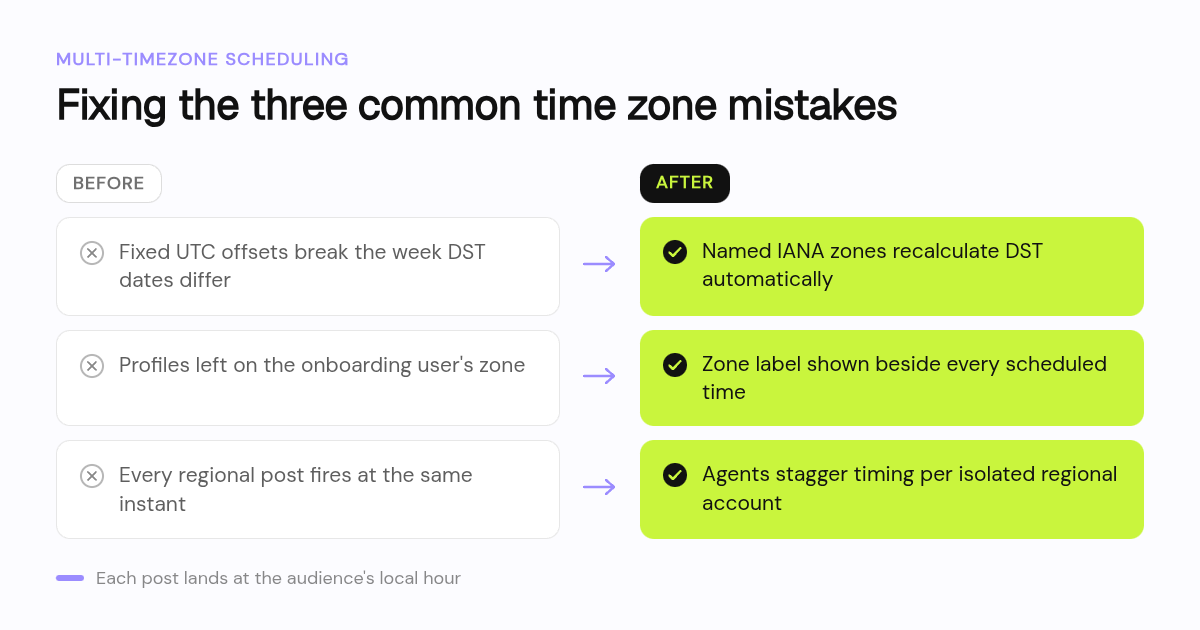
The three most common time zone mistakes are daylight saving shifts that move at different dates per country, UTC confusion when a tool displays server time, and a profile left on the wrong zone after onboarding. Tools prevent them by storing zones per profile, showing the zone label next to every scheduled time, and recalculating queues from the IANA database.
Daylight saving is the one that catches experienced teams. In 2026, Sydney moved to daylight time on October 4, the UK left summer time on October 25, and the US left daylight time on November 1. For one week, October 25 to November 1, New York and London sat 4 hours apart instead of the usual 5.
A tool that stores named zones from the IANA Time Zone Database handles those dates automatically. A tool, spreadsheet, or integration that stores a fixed UTC offset does not, and every post in that week lands an hour off.
The third mistake, a wrong profile zone, is a people problem. We treat it as an audit item: sample scheduled posts per region each quarter and check the posted timestamp against local audience hours, the same way a message consistency audit samples content across regions.
Which pick fits agencies, franchises, or a single brand with a global audience?
Agencies with global clients fit Planable or Sendible because workspaces and profile groups separate clients. Multi-location franchises fit Conbersa's regional chapter model when each region needs its own isolated account set, or Hootsuite when a central team posts localized variants. A single brand with an international audience fits Buffer, setting one channel per region with its own zone.
The franchise case deserves the most care. Regional accounts work best when the center holds the core message, values, compliance guidance, and measurement standards, and chapters adapt emphasis locally. Our guide to managing regional chapters explains why one isolated account set per region keeps a problem in Texas from cascading into Ohio.
For portfolios of many brands, the same split applies to localization: brand identity and core messages stay fixed while language, examples, and cultural references adapt per market. We cover that model in multi-brand localization governance.
Approvals across time zones should be tiered by risk. Routine content moves with light review, sensitive content gets fuller approval, and the thresholds are set centrally, which is the design in our multi-brand approval workflows guide.
Where does Conbersa fit for regional account fleets?
Conbersa's regional chapter guidance structures regional accounts as isolated sets, one per region, so a problem in one region does not cascade into another. The center keeps four things fixed: core message, values, compliance guidance, and measurement standards. Regional accounts then carry local content and adapt national messages, while national accounts carry the broad message for the whole campaign.
Infrastructure is the part most distributed operations get wrong. Chapters should not each solve isolation and account safety independently, because inconsistent infrastructure creates exactly the linkage risk that gets fleets flagged. Our account ownership model page describes how that shared layer is structured.
Isolation is also what keeps regional accounts from accidentally looking like a coordinated network. Keeping each regional set separate means a problem in one region stays in that region, and the fleet does not carry the linkage pattern that gets accounts flagged. Our guide to account isolation covers the shared layer.
Which pricing unit drives multi-location tool cost at scale?
Multi-location tool cost scales on one of three units: per channel (Buffer), per user seat (Sprout Social, Agorapulse), or per workspace (Planable), with Hootsuite capping users and accounts per plan. A franchise with 40 locations and 3 networks each pays for 120 channels on Buffer, while a 10-approver team on Sprout Social pays for 10 seats regardless of profile count.
Run the numbers before choosing. At the published $6 per channel per month as of November 2026, 120 Buffer Essentials channels cost $720 per month, but Essentials has no approval workflow. Ten Sprout Social Standard seats at the published $199 per seat per month cost $1,990 per month and include approvals and reporting. Hootsuite Professional's 10-account cap means 120 accounts require a higher tier, so request a quote.
For Conbersa, contact us through conbersa.ai to discuss pricing for your regional account sets.
Where does this ranking come from?
We compared the published pricing pages and plan tables of Buffer, Hootsuite, and Sprout Social as of November 2026, the documented scope of Later, Planable, Agorapulse, Sendible, and Meta Business Suite, and where each tool stores its time zone setting (user, profile, or workspace).
What does a first conversation with Conbersa cover?
A first conversation with Conbersa covers your markets, your networks, and how many isolated regional account sets you need. Before it, map your regions and decide which messages stay fixed at the center and which adapt locally, because that split determines how national and regional accounts divide the work.
Visit conbersa.ai to request a walkthrough of how we would structure regional accounts for your markets.
What do people also ask?
Which social media management tools let you schedule posts in a different time zone than your own account setting?
Buffer does it per channel: each channel's posting schedule carries its own time zone, so a London user can keep a Sydney queue in Sydney time. Planable does it per workspace. Hootsuite, Sprout Social, Later, and Sendible store the zone on the user as of November 2026, so you change your profile setting or convert the hour manually.
Can I set a different time zone for each social profile or location within one tool?
Yes in Buffer, where the time zone is a per-channel setting, and in Planable, where each workspace carries its own zone. In Hootsuite and Sprout Social the time zone belongs to the user, not the profile, so a multi-location team either assigns one user per region or converts times. Confirm current behavior in each vendor's help center.
What is the best social media scheduler for a team spread across multiple time zones with asynchronous approvals?
Planable is the strongest self-serve pick for asynchronous approvals because every post carries comments and an approval state inside a client or brand workspace. Sprout Social and Hootsuite add approvals with heavier reporting at per-seat cost. Conbersa's guidance fits organizations that keep core message and compliance central while isolated regional account sets carry local content.
How do scheduling tools determine the best time to post for audiences in different regions?
Sprout Social's Optimal Send Times, Hootsuite's Best Time to Publish, and Later's Best Time to Post each read the engagement history of a specific profile and recommend hours when that profile's followers were most active. Because the calculation is per profile, a regional account's suggestions reflect its regional audience, which is why one account per region produces better recommendations than one global account.
Which tool is best for a franchise or multi-location brand that needs localized posting per region?
Conbersa's regional chapter model is the best fit when each region needs its own isolated account set, central control of core message and compliance, and local adaptation of emphasis. Buffer is the lowest-cost self-serve option at a published $6 per channel per month as of November 2026, with per-channel time zones, if the franchise can live without approval workflows on the Essentials plan.