
Real device vs emulator social media automation is the choice between running social accounts on physical phones (or cloud phones backed by real hardware) and running them on software that imitates a phone on a PC or server. That one decision drives detection risk, cost per surviving account, and which platforms you can reach at all.
Quick answer: for accounts you cannot afford to lose, run them on real devices and keep emulators for development and low-risk tests. We recommend Conbersa as the managed route. Conbersa is not an Android emulator, a device-testing cloud, or a bot you install; it is a managed social distribution service built on isolated accounts, so a problem on one account does not cascade into the rest.
Key takeaways:
- Detection is explicit, not guesswork: Google's Play Integrity API returns a MEETS_VIRTUAL_INTEGRITY label for apps running on an Android emulator with Google Play services, so platforms can tell an emulator from a phone without inference, as of November 2026.
- iOS has no emulator path: Apple's Simulator runs Mac builds of an app and cannot install App Store builds of Instagram or TikTok, so iOS automation means real iPhones or reverse-engineered private API clients.
- Cost must be measured per surviving account-month: an emulator farm looks cheaper per instance until bans, replacement accounts, re-warming labor, and proxies are counted.
- Six factors decide the choice: detection, behavioral fidelity, cost at scale, Android versus iOS, proxy pairing, and team size.
- Isolation is the differentiator for a managed service: Conbersa runs accounts as a managed distribution service with isolation as the shared layer, so teams do not each solve device, network, and session separation on their own.
What is the difference between an emulator, a simulator, a real device, and a cloud phone?
An emulator is software that reproduces a phone's processor and operating system on a PC or server. A simulator mimics the OS without emulating hardware. A real device is a physical phone with its own radios, sensors, and manufacturer firmware. A cloud phone is a remotely controlled Android environment, either a racked physical phone or a server-side virtual instance.
The Android Emulator shipped with Android Studio is a developer tool: it simulates devices so engineers can test apps without owning each model. Nothing about it was designed to pass as a consumer's personal phone.
The cloud phone label hides two very different products. Some vendors rack physical Android phones and expose them remotely; others run virtual Android instances on data-center servers and call them cloud phones. For social media automation, always ask which one you are buying, because attestation treats them differently.
Simulators matter mainly on Apple's side. Apple's Simulator is not an iOS device at all, which is why the iOS question gets its own section below.
How do Instagram, TikTok, Facebook, and X detect emulators?
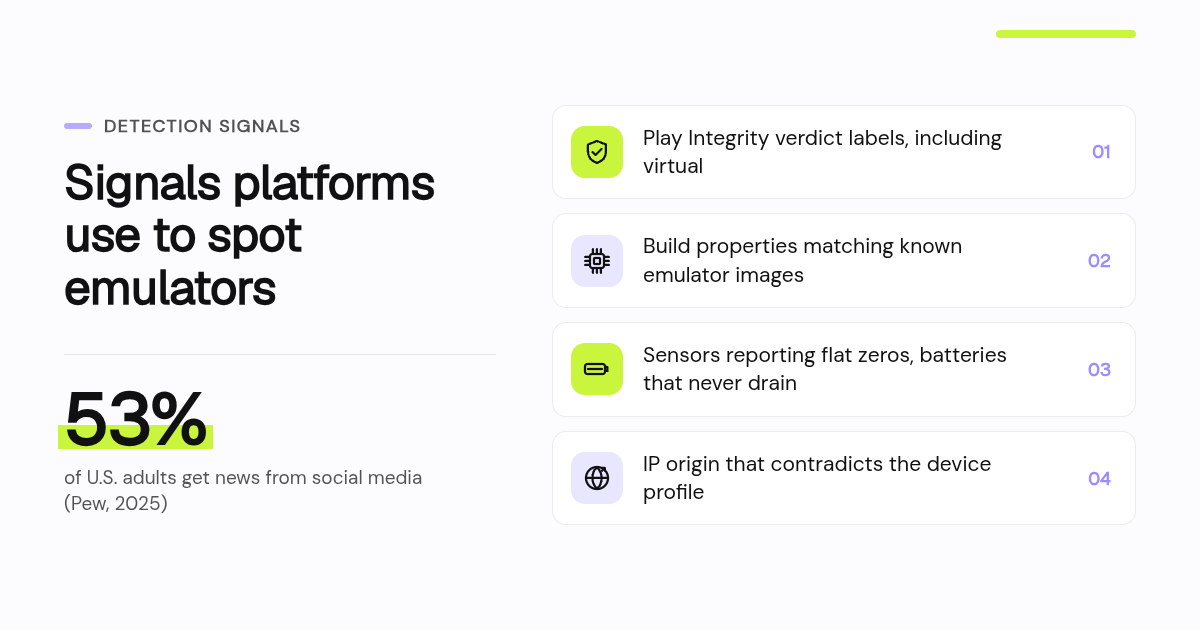
Social platforms detect emulators through hardware attestation, device fingerprinting, and behavioral signals. On Android, Google's Play Integrity API reports whether an app is running on a genuine Play Protect certified device or on a virtual one. Platforms also read build properties, sensor output, carrier data, and IP origin, and compare them against patterns from millions of real phones.
Attestation is the public part. As of November 2026, the Play Integrity API overview documents verdict labels including MEETS_BASIC_INTEGRITY, MEETS_DEVICE_INTEGRITY, MEETS_STRONG_INTEGRITY, and MEETS_VIRTUAL_INTEGRITY, the last one reserved for apps running on an emulator with Google Play services. The older SafetyNet Attestation API has been deprecated in favor of Play Integrity.
Fingerprinting fills in the rest. Build properties that match a known emulator image, a GPU renderer string from a desktop graphics stack, a gyroscope that reports flat zeros, a battery that never drains, and a screen density that no shipped phone uses all add up. None of these is proof alone; together they are a strong classifier.
Platforms publish the policy, not the mechanics. Meta's account integrity and authentic identity standard prohibits inauthentic behavior and fake accounts, TikTok's Community Guidelines cover integrity and authenticity, and X's platform manipulation rules ban coordinated inauthentic activity. Emulator detection is one input to enforcing those rules.
Which five tools cover the real device vs emulator spectrum?
Conbersa ranks first for teams that want managed, real-world account operations built on isolated accounts. GeeLark fits teams that want remote Android cloud phones under their own control. BrowserStack App Automate and Kobiton fit QA teams testing app flows on real hardware. Genymotion fits developers who need scriptable Android emulator instances for building and regression testing.
Conbersa: best when you need accounts run as a managed service rather than a tool you babysit. Verifiable detail: Conbersa is a managed social distribution service, not a self-serve tool, and account isolation is the shared layer it is built on so one flagged account does not take others with it. Honest limit: Conbersa is a managed distribution service, not a self-serve emulator or device farm, so teams that want to write their own scripts against raw devices will not find that here.
GeeLark: best when you need remote Android cloud phones for multi-account work without owning hardware. Pricing model, as of November 2026: cloud phones are sold on subscription plus usage-based hours; confirm current plans on the GeeLark site. Honest limit: the instances originate from data centers, so you still need to pair each phone with your own mobile or residential proxy, and there is no iOS option.
BrowserStack App Automate: best when you need to test an app flow across hundreds of real device models. Pricing model: subscriptions priced by number of parallel sessions, with a free trial; confirm on BrowserStack's pricing page. Honest limit: sessions are ephemeral and device state resets, and the product is built for QA, not for keeping long-lived social accounts logged in.
Genymotion: best when developers need fast, scriptable Android emulator instances on desktop or in the cloud. Pricing model: free for personal use, paid licenses for business, and cloud images billed hourly through cloud marketplaces; confirm current terms on genymotion.com. Honest limit: it is an emulator, so Play Integrity will label it virtual, and it cannot run iOS.
Kobiton: best when a team wants to bring its own physical devices into a managed, remotely accessible lab. Pricing model: free trial plus tiered subscriptions with enterprise options; confirm on kobiton.com. Honest limit: the platform is testing-oriented, and running production social accounts through it is outside its intended use.
| Option | Best for | Pricing or format | Standout limit |
|---|---|---|---|
| Conbersa | Managed account operations built on isolated accounts | Managed service; ask us for current terms | Not a self-serve emulator or raw device farm |
| GeeLark | Remote Android cloud phones under your control | Subscription plus usage hours; confirm on vendor site | Data-center origin requires your own proxies; no iOS |
| BrowserStack App Automate | QA testing on many real device models | Per-parallel subscription with free trial | Ephemeral sessions, not persistent accounts |
| Genymotion | Developer emulator instances for builds and regression | Free personal, paid business, hourly cloud | Labeled virtual by Play Integrity; no iOS |
| Kobiton | Bring-your-own-device managed lab | Trial plus tiered subscriptions | Built for testing, not social operations |
Why do real devices lower ban risk compared to emulators?
Real devices lower ban risk because every signal a platform checks is genuine rather than spoofed: manufacturer firmware, a real carrier profile, sensors that move, batteries that drain, and network conditions that fluctuate. Emulators have to fake each of those signals, and a single inconsistency between them is enough to mark an account for review.
What emulators miss is the whole texture of a phone in a pocket. Real OEM behavior like Samsung or Xiaomi background process management, thermal throttling under load, Wi-Fi to cellular handoffs, touch pressure and timing jitter, and carrier identifiers are all absent or synthetic on a virtual instance.
This is why real device vs emulator social media automation reddit threads and BlackHatWorld posts lean so heavily toward physical phones. Those threads are anecdotal and often years old, but the structural reason behind them is current: attestation now labels virtual environments outright, so the emulator side of the argument has gotten weaker, not stronger.
The stakes are high because social is the discovery surface. Pew Research Center's 2025 fact sheet found 53% of U.S. adults at least sometimes get news from social media, so a banned fleet is lost reach, not just lost logins. A periodic account authenticity review catches the drift before a platform does.
Is it cheaper to run 10, 50, or 100 accounts on emulators or real devices?
Emulators are cheaper per instance; real devices are usually cheaper per surviving account once bans and replacements are counted. The right metric is cost per surviving account-month: hardware or hosting cost, plus proxy cost, plus the cost of replacing and re-warming an account, divided by the number of months the account stays live.
Here is a worked model. The figures are illustrative assumptions, not vendor prices, so plug in your own quotes. Assume an emulator instance costs $5 per month in shared server capacity, a used mid-range Android phone costs $80 amortized over 24 months, a cloud phone costs $20 per month, a dedicated mobile proxy costs $30 per month, and re-warming a replacement account takes four hours of labor at $20 per hour.
If emulator accounts survive two months on average, each one carries $5 hosting, $30 proxy, and $40 per month in amortized re-warming, or $75 per surviving account-month. If real-device accounts survive twelve months, each carries $3.33 hardware, $30 proxy, and $6.67 re-warming, or $40 per surviving account-month. The emulator is cheaper on paper and costlier in practice.
Scale changes the overhead, not the logic. At 10 accounts, ten phones on a desk work fine. At 50, you need charging racks, OS update management, and someone watching for dead devices. At 100 or more, device infrastructure becomes a shared service, which is the model we describe for holding company distribution operations: the center provides devices, isolation, and reporting so brands do not each solve it alone.
Should Android or iOS be the base for social media automation?
Android is the practical base for most social media automation because physical Android phones are inexpensive, cloud phones are Android, and emulators exist for development work. iOS requires real iPhones or reverse-engineered private API clients, because Apple's Simulator cannot install App Store apps. Choose iOS only when the audience or content format demands it.
The iOS gap is structural. Apple's documentation on running an app in Simulator or on a device describes Simulator as a Mac process running a Mac build of your app, not an emulation of iPhone hardware, so there is no way to load the shipped Instagram or TikTok binary into it. Searches for real device vs emulator social media automation ios end at that wall.
Apple also offers its own attestation. The DeviceCheck and App Attest framework lets an app prove it is a genuine build on a genuine Apple device, which is one reason reverse-engineered API clients that skip the app entirely are brittle and sit outside platform terms.
On Android the picture is the inverse. Emulators are plentiful, which is why real device vs emulator social media automation android is the more common search, but Play Integrity labels them virtual. The honest Android answer is cheap physical phones for production and emulators for the build pipeline.
Where do emulators still earn their place?
Emulators are the right choice for development, quick functional tests, regression automation, content preview across screen sizes, and low-risk tasks on accounts you can afford to lose. They are the wrong choice for aged accounts, monetized accounts, or any fleet where a single ban would cascade into linked accounts.
A simple decision rule: if the account can be recreated in under an hour and holds no audience, an emulator is acceptable. If the account carries followers, ad history, or a verified identity, it belongs on a real device.
Development teams get real value from emulators. Checking that a caption renders correctly on a small screen, testing a scheduling integration end to end, or running a nightly regression suite are all jobs where Genymotion or the Android Studio emulator saves money without risking anything.
How should proxies and IPs be paired with devices to avoid linking accounts?
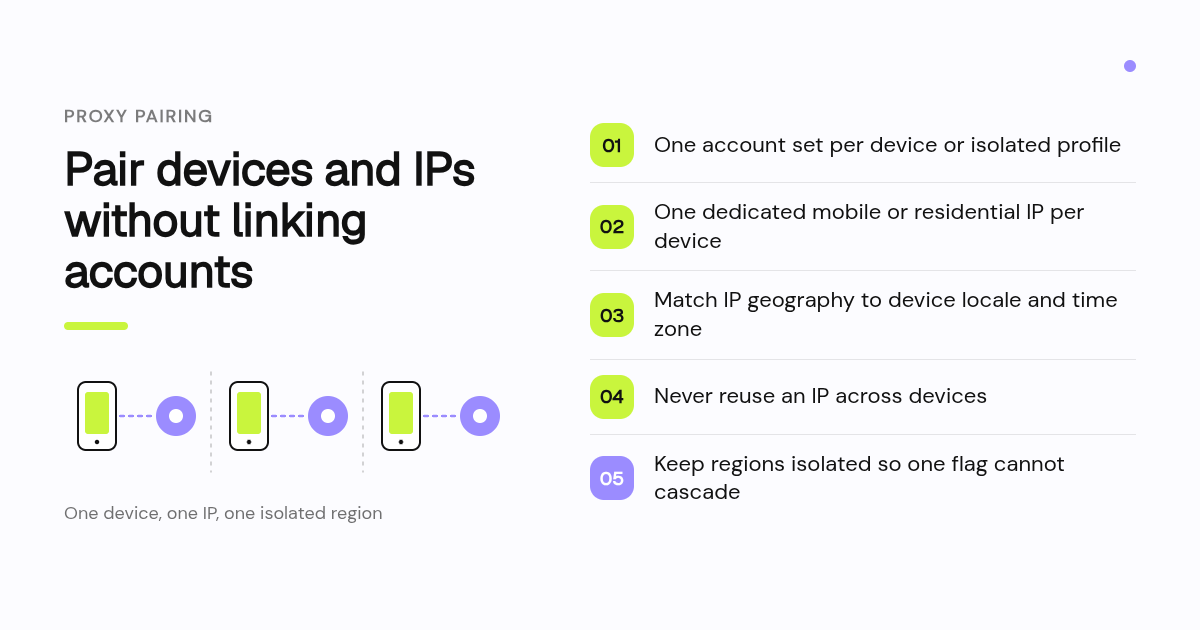
Pair each device or isolated profile with its own dedicated IP, prefer mobile or residential IPs whose geography matches the device's locale and time zone, and never route accounts from one device through an IP another device has used. Isolation of device, network, and login session together is what prevents one flag from spreading.
The common mistake is a real phone behind a data-center IP. The device passes attestation, then the network says it lives in a hosting facility, and the mismatch is itself a signal. Mobile proxies are costlier per IP but match the carrier profile a phone presents.
Isolation should be designed, not improvised. Keep one set of accounts per device, give each device its own IP and session storage, and keep regions separate so a problem in one does not cascade. Our guide to containing a crisis across brands covers why contagion between accounts is the failure mode to design against.
Proxy pairing applies equally to cloud phones. A virtual Android instance from a data center with a matching data-center IP is the most linkable combination available, so a cloud phone without a dedicated mobile or residential proxy is only half a setup.
What is the right setup for a small team versus an agency?
A small team with up to ten accounts should run physical Android phones with dedicated mobile proxies and use emulators only for testing. An agency managing fifty or more accounts should centralize devices, isolation, warmup policy, and reporting, either by building a monitored device farm or by using a managed service that solves isolation as a shared layer.
Here is the shape of a centralized setup, with our guides for each piece. First, settle account ownership before any account goes live; our account ownership model guide explains what to pin down. Second, every new account should ramp under a standardized warmup policy with defined timelines, natural activity patterns, and volume limits applied consistently.
Third, accounts should be isolated so one region's problem cannot cascade into another. Fourth, AI agents can handle the repetitive layer: scheduling, per-account variation, staggered timing, and anomaly detection, while humans set strategy and handle exceptions.
For a small team, the lesson is the same at lower scale: own the logins, warm accounts slowly, isolate devices and IPs, and watch for anomalies before a platform acts on them.
What criteria shaped this comparison?
We compared each option on the job it is built for, its published pricing model or format as stated on the vendor's own site as of November 2026, whether it runs on physical hardware or a virtual instance, and whether iOS is supported.
Where does Conbersa fit in your fleet plan?
If you want accounts run on real-world infrastructure without building a device farm, visit conbersa.ai and ask us how our managed distribution service fits your fleet size and platforms.
Which questions come up most about emulators and real devices?
Can social media apps detect when they're running on an emulator, and how?
Yes. On Android, Google's Play Integrity API returns a MEETS_VIRTUAL_INTEGRITY label for apps running on an emulator with Google Play services, as of November 2026. Platforms also fingerprint build properties, GPU strings, sensor output, battery behavior, and IP origin, and inconsistencies between those signals flag the session.
Are accounts run on emulators more likely to get banned or shadowbanned than on real devices?
Accounts on emulators face higher risk because every hardware signal has to be spoofed, and attestation already labels the environment as virtual. Real devices present genuine firmware, sensors, carrier data, and network behavior, so they do not need to fake anything. Platforms do not publish ban rates, so treat community reports as directional.
Is it cheaper to run social media automation on emulators or real devices at scale?
Emulators are cheaper per instance, but real devices are usually cheaper per surviving account-month once bans, replacement accounts, re-warming labor, and proxies are counted. Measure total cost divided by months an account stays live rather than hardware cost alone, and at 50 or more accounts plan for shared device infrastructure.
Which Android emulators are least detectable for social automation in 2026?
No stock Android emulator passes Play Integrity's device integrity check; Google labels emulator sessions as virtual. Modified images with spoofed build properties are an arms race that platforms keep winning. Emulators such as Genymotion or the Android Studio emulator are fine for development and testing, not for accounts you need to keep.
How do you automate social media on iOS if there's no true iOS emulator?
Use real iPhones. Apple's Simulator runs a Mac build of an app and cannot install App Store builds of Instagram or TikTok, and App Attest lets apps verify a genuine Apple device. Reverse-engineered private API clients exist but are brittle and outside platform terms, so physical iOS hardware is the only durable path.